What if you could ask AI about your projects?

Need a quick update on project progress, logged hours, or your team’s upcoming workload? Imagine getting those answers directly from your AI assistant. Severa MCP (Model Context Protocol), currently being tested with selected customers, opens up new ways to work with project data. Severa Product Manager Rasmus Pohjoiskoski explains how the connection works, what it makes possible, and how you stay in control of your data.
How many hours have we spent on that client project this week? Does the team have enough capacity next month? And did I remember to log the time from yesterday’s client meeting?
These are everyday questions in project-based businesses. The answers are often already there in the systems we use. But finding the right information, pulling it together, and keeping everything up to date still takes time.
That’s why we’ve developed Severa MCP. MCP stands for Model Context Protocol, a technology that allows AI assistants to connect to external systems and access their data.
Severa MCP connects Severa with AI tools such as Claude, Copilot, or an AI agent your company has built. Through this connection, your AI assistant can retrieve information from Severa and help with tasks such as logging hours and updating records.
Severa MCP is currently being piloted with selected customers, with plans to make it more widely available in the future.
One question keeps coming up when we talk about Severa MCP: Is Severa MCP an AI agent?
No, it isn’t. Severa MCP is the connection between Severa and your AI assistant. Understanding that difference matters, especially when it comes to what the assistant can do and who controls access to your data.
What can you do with Severa MCP?
Let’s take a typical workday.
You’re preparing for a client meeting and want a quick overview of the account. Which projects are currently active, and how many hours have been logged on them?
With Severa MCP, you can ask your AI assistant to gather that information from Severa instead of looking it up piece by piece.
Need more detail? Just continue the conversation:
“Break down the hours by team member.”
“Show me the same information for last month.”
After the meeting, you can ask the assistant to add an activity and log the time spent on the right project. You review the suggested entries before they’re saved.
The same approach can help with checking timesheets, following project progress, or reviewing upcoming resource allocations.
There’s no need to move your project data into another system. The information stays in Severa. You simply have another way to access and work with it.
What does the AI assistant do, and what does Severa MCP do?
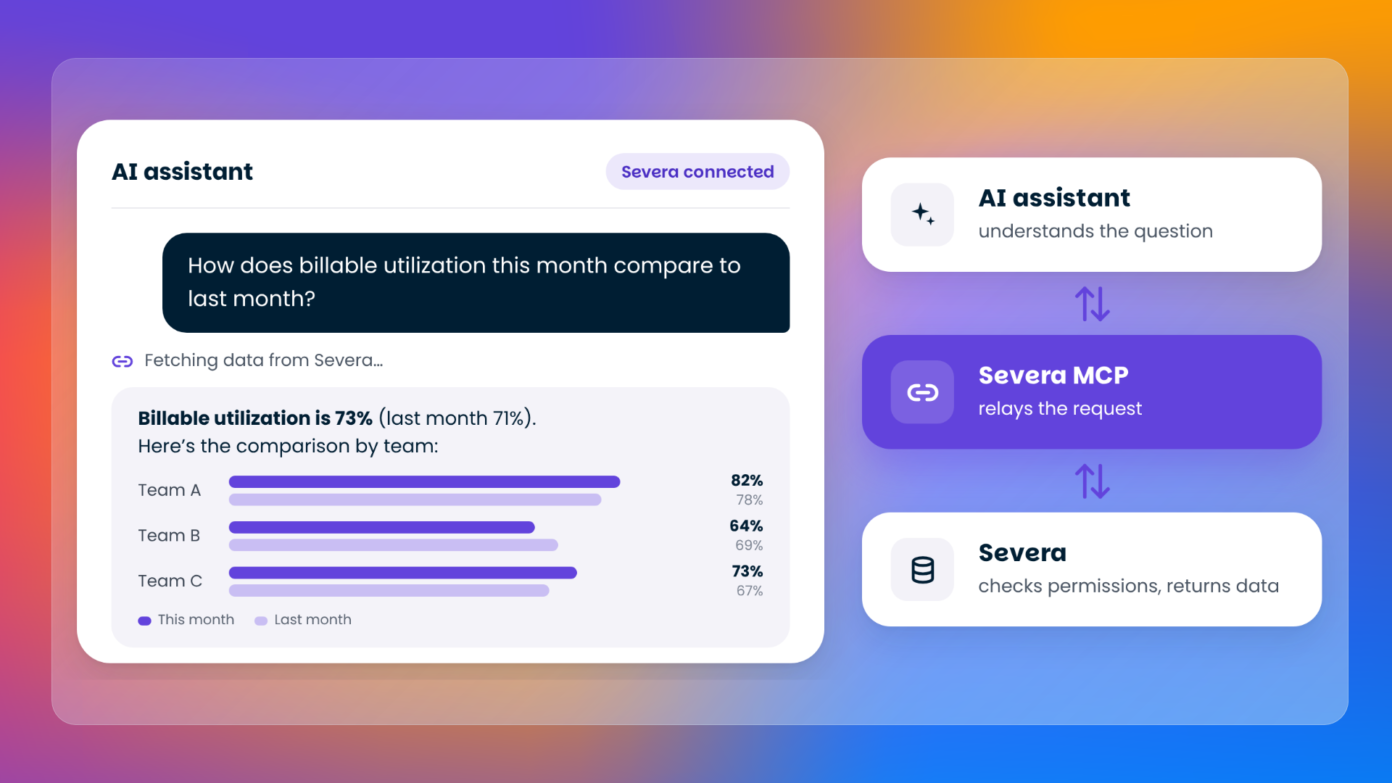
Your AI assistant handles the conversation and reasoning. That happens in the AI tool you’re using, whether it’s Copilot, Claude, or something your team has built.
Severa MCP provides the connection to Severa. It defines which data and actions the assistant can access and ensures that access follows your existing Severa permissions.
Severa MCP doesn’t run an AI model of its own. The AI capabilities come from the assistant you’ve chosen to use.
If your company builds an agent in Copilot Studio, for example, that agent is managed by your organisation. Severa MCP is simply one of the connections it uses.
My advice? Give your agent a name that describes what it actually does, such as “Project Assistant”. That way, people know what to expect from it.
Who can access your Severa data?
When AI tools connect to business data, questions about security and access naturally come up.
The most important thing to understand is this: Your AI assistant cannot access more information through Severa MCP than you’re allowed to access yourself.
You sign in with your own Severa account, and your existing permissions still apply. If you can’t see certain information in Severa, your AI assistant can’t retrieve it for you either.
But what if an AI agent appears in Teams for people who shouldn’t have access to your company’s Severa data?
These are two separate things. Who can see and use an agent is controlled through settings in tools such as Teams and Copilot. Accessing Severa data requires a user account in the relevant Severa organisation, access to Severa MCP at the organisation level, and the appropriate user permissions.
AI tool licences and your company’s own policies for using AI are also managed on your organisation’s side.
In short, Severa MCP manages the connection and access to Severa. Your organisation decides how its AI assistants are made available and used.
Can an AI assistant make changes in Severa?
Yes, but those changes shouldn’t happen without you knowing about them.
Through Severa MCP, an assistant can create and update work hours, activities, and travel expenses. It can also make certain changes to projects, project phases, and resource allocations, including closing a project.
What it cannot do is delete data from Severa.
How changes are approved depends on the action and the AI tool you’re using.
For work hours, activities, and travel expenses, Severa shows you the proposed entries and asks for your approval in supported, up-to-date AI applications. For other changes, such as project updates and resource allocations, confirmation is handled by your AI tool.
It’s always worth checking the details before approving anything. AI can misunderstand instructions, after all. If you ask it to log two hours on a client project, make sure the project, date, and number of hours are correct.
The assistant can help you get things done, but you’re still responsible for what gets recorded.
Start with the everyday tasks
When we talk about AI, the conversation often turns to big changes and new ways of working. Personally, I think some of the most interesting opportunities are found in much smaller, everyday tasks.
Think about the information you regularly look for during your workday. Is it logged hours, project status, your team’s availability, or client details before a meeting?
These are exactly the kinds of situations where connecting Severa to an AI assistant can make a difference. When you can get the information you need simply by asking, and then move straight on to the next task, there’s less time spent on administration and more time for actual client work.
The goal isn’t to give you yet another tool to learn. It’s to help you get more value from the data and systems you already use.
Want to make project work easier?
Severa helps professional services businesses manage projects, resources, time tracking, and profitability in one place. Explore what Severa can do for your business, or talk to one of our experts about making your project work run more smoothly.

Rasmus Pohjoiskoski is Severa’s Product Manager and one of the key people behind the user interface redesign. He has a background as a startup entrepreneur and a strong interest in building products that create real value for customers. In his free time, Rasmus enjoys nature and water, and can often be found on the golf course or in the winter on the ski slopes.